
Substitutes
How to build a substitute pool and cover a golfer who can't make it, without scrambling the morning of.
Adding a substitute
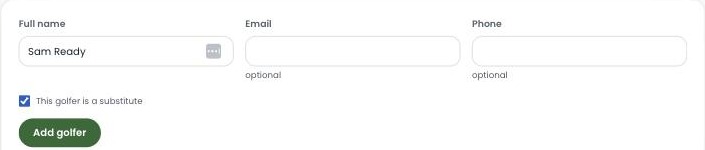
Add a substitute the same way you add any golfer, on the Roster — just check "This golfer is a substitute." They join your league's designated substitute pool instead of a team roster, ready to be called on whenever a spot opens up.
The substitute pool
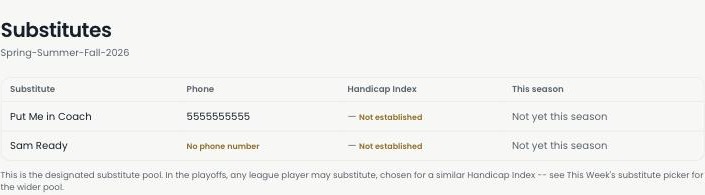
The Substitutes page lists everyone in your designated pool — their phone number, Handicap Index, and whether they've played yet this season. It's the first place to look when someone drops out.
Marking a golfer out
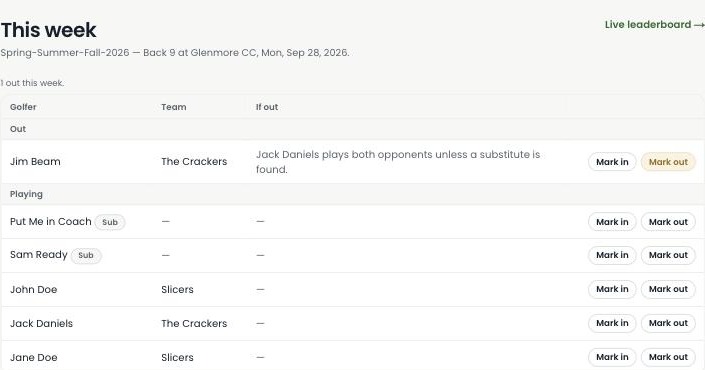
On This week, mark a golfer out and The Turn tells you exactly what that means for their match — here, "Jack Daniels plays both opponents unless a substitute is found." No guessing who's affected.
A wider pool in the playoffs
The designated pool isn't the only option once the playoffs start. Any golfer already in the league may substitute, chosen for a similar Handicap Index, through This Week's substitute picker — so a tight bracket doesn't come down to who happened to sign up as a sub.
New to setting up a league? Start with the How to start a golf league guide — it covers substitutes as part of building your roster.
Ready to build your own pool?
Substitutes are live in the product today — not a roadmap slide.
Start your league →